Connections
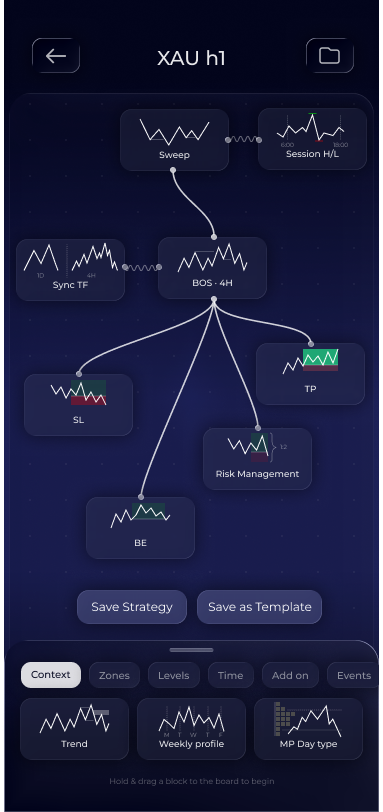
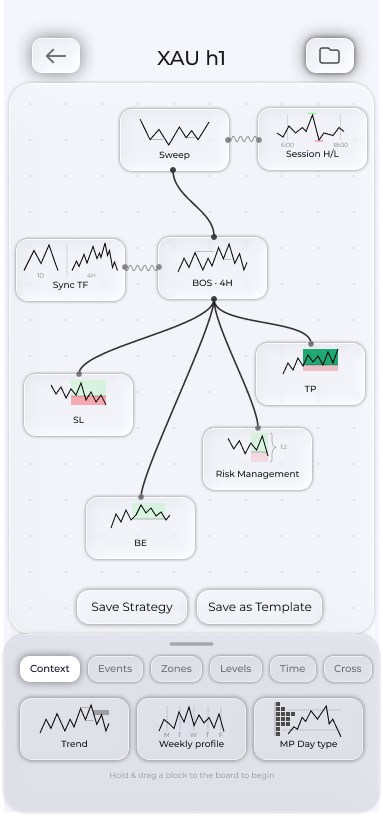
Wires connect blocks into a strategy layout. There are two types: block-input wires and chain wires.
Input wires
Input wires are wavy. They connect to the left or right side of a block and define its dependency on another block at the same point in time. The app inserts or connects required inputs automatically, for example:
- A zone or level dropped onto the Whiteboard connects itself to Zone Touch, creating a touch entry automatically;
- Trend connects to the first block. You define the subsequent connections yourself;
- If there is one suitable source, it connects automatically. If there are several, you choose which source to use.
Zone Break is connected manually only: entering on a zone break is always your deliberate choice.
Chain
A chain connects to the top or bottom of a block and determines the direction and order of actions in the strategy.
Chain settings
Tap a chain to open its settings. Each connection has its own:
- Chain lifetime in candles.
- Trigger depth for moving to B/E or trailing;
- Session for range wires;
- For chains leading to Risk Management, an option to reduce risk to a set level.
- Remove any chain using Remove Connection at the bottom.
If you cannot understand why the layout will not save, a missing wire is often the cause. Validation names the block and required connection when you save.